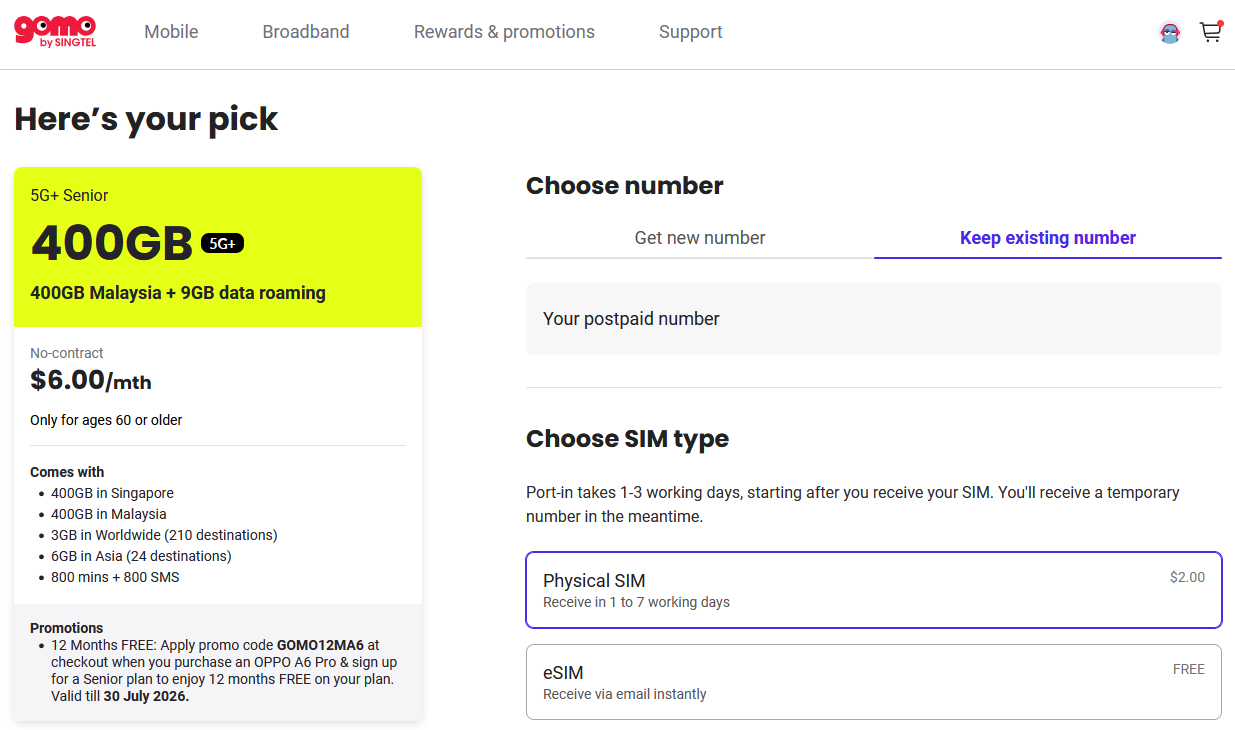
This Gomo Senior Plan switch started with good intentions and a genuinely great deal, and ended up being more of a headache than I expected. Some of that was on me. Some of it, I think, is a gap both Circles.life and Gomo should really close. Here’s what happened trying to move my mother onto Gomo’s Senior Plan.
Quick summary: I tried porting my mum’s number from Circles.life to the Gomo Senior Plan ($6/month) to save about $24 a month. The port got rejected because the existing line was under my name, not hers, and neither telco could fix it. I ended up having to terminate the Gomo line entirely, which turned into a roughly 2-hour ordeal via chat support alone.
Why the Gomo Senior Plan Made Sense for My Mum
My mum’s existing Circles.life plan was costing about $30 a month for the base plan: 4GB data, 100 minutes, and 25 SMS. On top of that, another $24 for an unlimited add-on plus SuperRoam Asia 2GB, offset by a $22 discount, bringing the net cost to around $32 a month.
For someone who isn’t particularly tech-savvy and uses barely 500MB of data a month, that’s an expensive plan relative to actual usage.
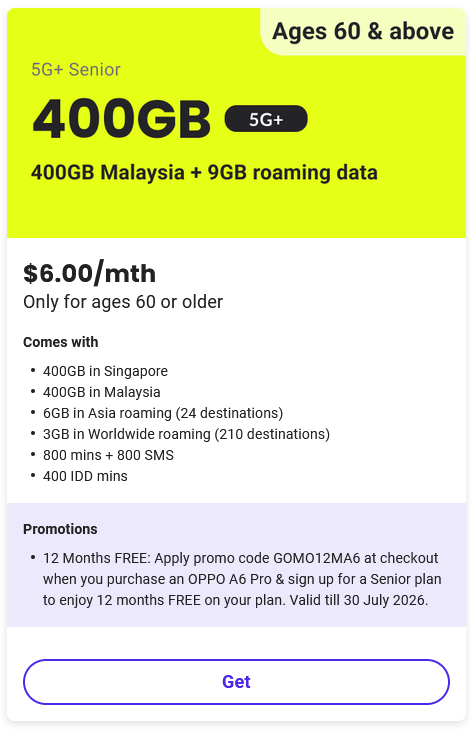
That’s when Gomo’s $6 Senior Plan caught my eye – 400GB in Singapore, 400GB in Malaysia, 3GB worldwide roaming across 50 destinations, 6GB in Asia across 18 destinations, and 800 minutes plus 800 SMS, all for $6 a month, no contract, for anyone 60 or older. I’ve actually been on Gomo myself since 2019 (on and off but eventually always making my way back to Gomo), not long after they launched, so bringing my mum onto the Gomo Senior Plan felt like a natural next step rather than a gamble on an unfamiliar telco. As a caregiver managing a parent’s mobile line, one thing you want above almost everything else is hassle-free, reliable coverage – in practice, that usually means less hassle for you, since any connectivity issue on her end tends to become your problem to sort out. Compared to what my mum was paying, that’s a savings of roughly $24 a month. An easy decision, or so I thought.
Where It Went Wrong: The Porting Rejection
Everything seemed fine until Gomo’s SIM card arrived and I checked the porting status – rejected. I went digging through both the Gomo and Circles.life apps to figure out why, and found the fatal oversight: the existing Circles.life line was registered under my name, while the new Gomo line was registered under my mother’s name.
A mismatch like that, understandably, blocks the port.
Trying to Fix the Ownership Mismatch
I assumed this would be a quick fix. I reached out to Circles.life first, and they told me they don’t offer a transfer-of-ownership service for an outgoing port – understandable, since the number was leaving their network. I then reached out to Gomo, who told me there was nothing they could do on their end either.
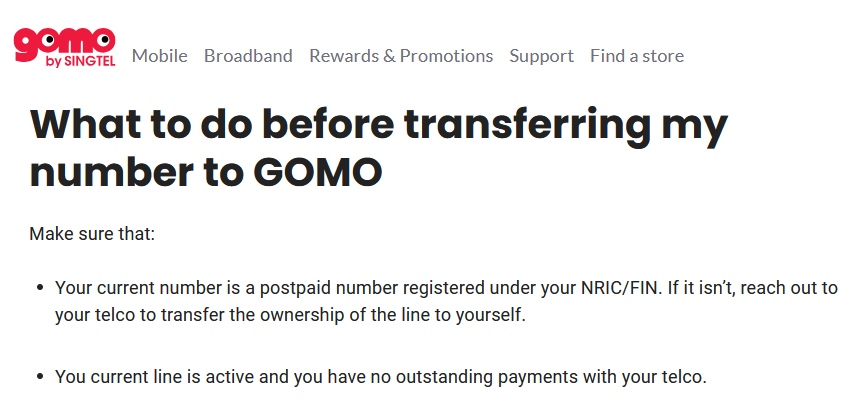
So I was stuck in the middle. After some digging, here’s what I found: this isn’t actually a “neither telco can help” situation – it’s specifically a Gomo limitation. A handful of Singapore telcos, including Gomo, Simba, and Giga, don’t support transfer of ownership when porting a number in. The number has to already be registered under your own NRIC before you can port it in. Gomo’s own guidance is to get your previous telco to do the ownership transfer first, which may come with its own fee depending on that telco.
Ironically, Circles.life itself does support transfer of ownership for numbers porting into them, letting you upload the current registered owner’s NRIC to complete it. The bigger telcos like Singtel and StarHub generally support this too. It’s really the newer, no-frills MVNOs like Gomo that don’t, likely as a tradeoff for keeping their plans cheap and their processes lean.
My preference at this point is still to keep my mum’s existing number if possible. If that proves too much of a hassle, my fallback plan is to get a new number under my mother’s name directly, then port that over to Gomo afterward.
Pro-tip: If you’re getting a new number rather than porting an existing one, shop around first. Some telcos let you choose from a fairly wide pool of available numbers, others offer a narrow selection, and some give you no choice at all. Worth checking this before you commit to a provider if having a specific or “nicer” number matters to you. I go into exactly which operators offer the widest number pools, plus a neat trick for reserving a number cheaply, in my best value mobile plan roundup.
The Real Frustration: My Gomo Termination Experience
The porting hiccup, frustrating as it was, turned out to be the easy part. The real ordeal was my Gomo termination experience afterward.
Here’s the logic: there’s no way to take advantage of the $6 senior plan for my mum while the line stays under my name. The only real path forward is a new line, properly registered under her name. You might ask why not just get a new line directly from Gomo instead of starting elsewhere – the answer is that Gomo’s selection of new numbers for new subscribers is noticeably narrower than what other telcos offer. So the plan became: sign up elsewhere for a number I actually like, then port that over to Gomo. At that point, continuing with the existing Gomo line made no sense either, since I didn’t want the temporary number assigned and couldn’t port my mum’s original number over anyway.
So, termination it was.
Gomo only offers online support, almost entirely through chat. The process went like this: start with a chatbot, explain I’m terminating my mobile line, get transferred to a human agent, then get put on hold repeatedly. Identity verification came next, an SMS PIN that didn’t actually work, followed by a SingPass verification instead. After that, I had to explicitly acknowledge the termination before it would go through.
All in, this took roughly 2 hours – not because any single step was difficult, but because of how much of that time was spent waiting. I ended up going back to my actual work in between waiting periods, then returning to the chat again.
Know What You’re Signing Up For: Gomo Is a Pure Digital MVNO
This is worth calling out clearly before you sign up: Gomo has no offline presence at all. No retail shops, no hotline, nothing beyond in-app and web chat support. Every interaction – sign-up, porting, termination, support – happens through that single channel. If you’re not familiar with what an MVNO actually is or how it differs from a traditional telco, I go into that in more detail in my roundup of the best value mobile plans in Singapore, which also covers where Gomo sits against the other MVNOs I’ve used.
This is a real contrast to Circles.life, which, while also primarily app-based, offers more in the way of broader support channels and, as I found out, even handles transfer of ownership for incoming ports. If something goes smoothly, Gomo’s lean, digital-only model is genuinely fine, even pleasant. But if something goes wrong, like my ownership mismatch did, you’re working through the same single chat channel for everything: diagnosis, escalation, and resolution, with no option to call someone or walk into a shop to speed things along.
Whether that tradeoff is worth it really depends on what you value. If you’re comfortable resolving things entirely over chat and mostly just want a no-frills, affordable plan, Gomo is hard to beat on price. If you’d rather have a phone line or a shop to walk into when things go sideways, that’s worth weighing before you commit, especially if you’re managing the line for someone else, like an elderly parent, who may need more hand-holding if support runs into friction.
My Gomo Referral Code, If You’re Considering It
Despite the porting and termination hassle, I still think Gomo’s senior plan is a genuinely good deal for an elderly user with low data needs. It’s also my top pick for most stable network in my full mobile plan comparison, if you’re weighing Gomo against other options for yourself rather than a family member. For the full breakdown of the referral program itself — how it works, what to expect after you sign up, and which Gomo plan actually fits your situation — see my dedicated Gomo Referral Code guide.
If any of this appeals to you, feel free to use my referral code:
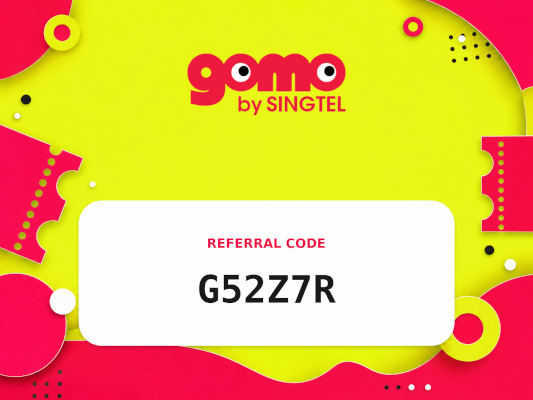
- Gomo: G52Z7R — works on any Gomo plan, not just the Senior Plan featured here. You get a $3 Grab voucher, I get a $5 Grab voucher when you complete sign-up
How to Enter the Referral Code
Gomo — enter it during the sign-up flow on gomo.sg. After you’ve chosen your number (or kept your existing one), selected your SIM type, chosen your device or continued without one, and retrieved your MyInfo via Singpass and confirmed your details — the promo code field appears at the next step. Enter G52Z7R there.
Disclosure: I earn a referral credit when you sign up using code G52Z7R. One rule I stick to: I only recommend products and services I actually use myself — referral reward or not. Looking for more? I keep all my active referral codes across telcos, apps, and services in one place: Referral Codes Singapore.
The Verdict
My experience moving my mum onto the Gomo Senior Plan, porting hiccup and termination saga included, was more frustrating than it needed to be, but a chunk of that was a planning oversight on my part – not checking that both lines were under the same name before starting the port. If you’re helping a family member switch onto the Gomo Senior Plan, double-check whose name is on the existing line before you even begin, since neither telco I dealt with was able to resolve a name mismatch after the fact.
That said, the termination process itself, nearly 2 hours over chat support alone, is a genuine weak point worth knowing about going in. If you’re considering Gomo, especially for an elderly family member’s line, go in prepared for that possibility, and make sure the names line up from the start.
Frequently Asked Questions
Does Gomo support transfer of ownership when porting in a number? No. Gomo requires the number you’re porting in to already be registered under your own NRIC. If it isn’t, Gomo suggests getting your current telco to perform the ownership transfer first, which may involve a fee depending on that telco.
Does Circles.life support transfer of ownership? Yes, for numbers porting into Circles.life. You can upload the current registered owner’s NRIC details as part of the process to complete the transfer.
Is the Gomo Senior Plan a good choice for an elderly family member’s mobile line? It can be, particularly at $6/month for those 60 and older, which offers a large data allowance for a low monthly cost. Just be aware that Gomo is a pure digital MVNO with no offline support, so any issues will need to be resolved entirely through in-app or web chat.
How long does a Gomo termination take? In my case, the entire termination process took roughly 2 hours, almost entirely due to wait times during chat support, identity verification steps, and being placed on hold repeatedly.
What is the Gomo referral code benefit? Using a referral code at sign-up gets the new subscriber a $3 Grab voucher, and the referrer a $5 Grab voucher once the sign-up is completed.