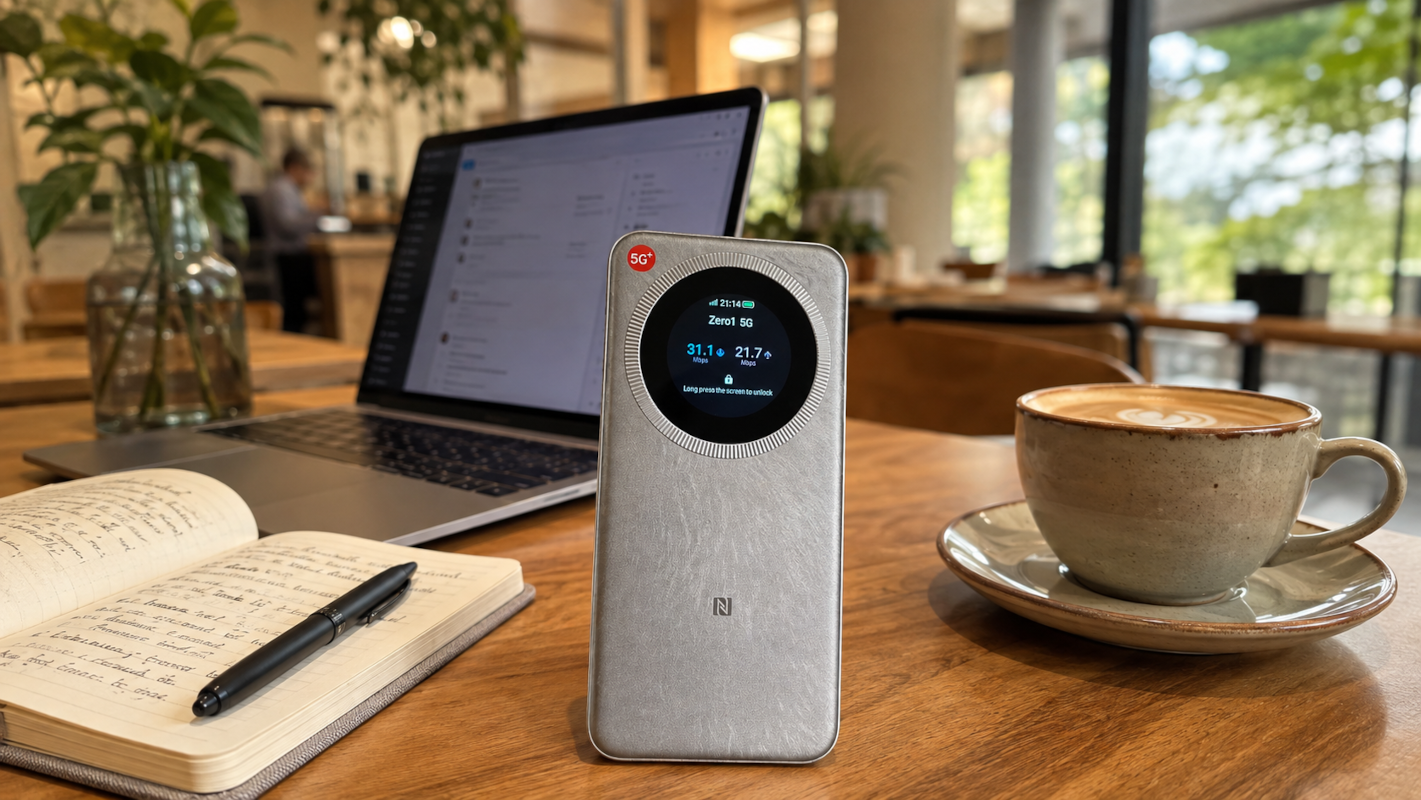
ZTE U30 Pro Review: The Budget 5G Portable WiFi Hotspot That Actually Works
Disclosure: I bought this device with my own money — this post isn’t sponsored by ZTE or anyone else. It contains a referral link (NordVPN) and affiliate links to Lazada and Shopee listings for alternative devices; if you sign up or purchase through them, I may earn a small commission at no extra cost to you. All opinions here are my own, based on actual use.
I didn’t plan on becoming someone who reviews mifi devices. But after my Huawei Mobile WiFi 2 Pro — a device I’d been running since 2019 — flat out refused to run at a decent speed anymore, I’m talking barely-usable-for-light-productivity levels of slow, I was forced to go shopping for a replacement. What started as an annoyance turned into this ZTE U30 Pro review, because honestly, I wasn’t expecting a budget option to actually deliver.
I use this thing for out-of-home work days and to keep my tablets online when I’m not near my home WiFi — basically, I went looking for a budget 5G portable WiFi setup in Singapore that wouldn’t let me down mid-task. So the bar was simple: it needs to actually work, and it needs to not cost a fortune.
Why I Was Shopping for a New Mifi in the First Place
The Huawei Mobile WiFi 2 Pro’s slow-speed problem wasn’t a one-off — it was consistent, annoying, and eventually just not worth troubleshooting anymore, six years in. I spent way more time restarting that device than I care to admit before accepting defeat and looking elsewhere.
The problem? Most mainstream brands in Singapore are priced like they know you’re desperate. A quick scan of what’s out there landed me on options starting from S$200 and upwards — fine devices on paper, but nearly double or triple what I was hoping to spend on what is, at the end of the day, a box that turns a SIM card into WiFi.
Enter the ZTE U30 Pro
Then I found the ZTE U30 Pro (model number MU5358) on Taobao — 5G, WiFi 6, supports up to 16 users, removable battery rated for around 10 hours, and takes an international SIM. The listing itself was S$120, with shipping to Singapore on top of that, paid out of my own pocket.
Buying direct off Taobao instead of through a local reseller came with real tradeoffs, though. No warranty. No guarantee whatsoever that it would actually work with Singapore telcos once it landed. And to make it worse, I couldn’t find a single review anywhere — English or otherwise — covering this exact device, so I genuinely had no idea if I was about to end up with an expensive paperweight.
I wasn’t just impulse-buying the first ZTE listing I saw, either. I actively weighed the U30 Pro against its own siblings — the U30 Air (cheaper, fewer features, no touchscreen) and the F50 (even more basic, no battery on some listings) — before deciding the Pro’s touchscreen, NFC, and QR login were worth the small premium over the Air.
At that price point I went in with fairly low expectations. Will a hotspot this cheap actually hold a stable connection, or am I about to relive the Huawei experience all over again? So far, it’s been the opposite — as far as budget 5G portable WiFi options in Singapore go, this has quietly become one of the better budget tech purchases I’ve made this year.
It runs on both my circles.life and zero1 SIM cards without a hitch, which matters if you’re the type to bounce between telco promos the way I do — I actually ported to Zero1 recently and unlocked 5G+ on a 4G-priced plan, and this hotspot has been the perfect way to actually use that 5G+ speed on the go. If you’re still shopping around for a SIM to pair with a hotspot like this, my roundup of the best value mobile plans in Singapore is worth a look too.
Battery-wise, the 10-hour claim holds up better than I expected — and then some. My son is permanently glued to YouTube on our iPad mini, and there have been more than a few nights where we’ve forgotten to switch the router off entirely. It’s still alive and kicking the next day – barely.
As for size, it’s basically like carrying another phone — think iPhone 17 Air territory. Not the smallest device out there, but it slips easily into a pouch, a backpack, or the rear pocket of your jeans without you noticing it’s there.
To be thorough, I ran Speedtest on both SIMs against both an M1 server and a Singtel server, on an Apple iPad Air (5th generation), so this isn’t just a single best-case number:
| SIM | Network | Server | Download | Upload | Ping |
|---|---|---|---|---|---|
| Circles.life | M1 | M1 | 183 Mbps | 112 Mbps | 24ms |
| Circles.life | M1 | Singtel | 186 Mbps | 111 Mbps | 24ms |
| Zero1 | Singtel | M1 | 511 Mbps | 121 Mbps | 27ms |
| Zero1 | Singtel | Singtel | 442 Mbps | 116 Mbps | 17ms |
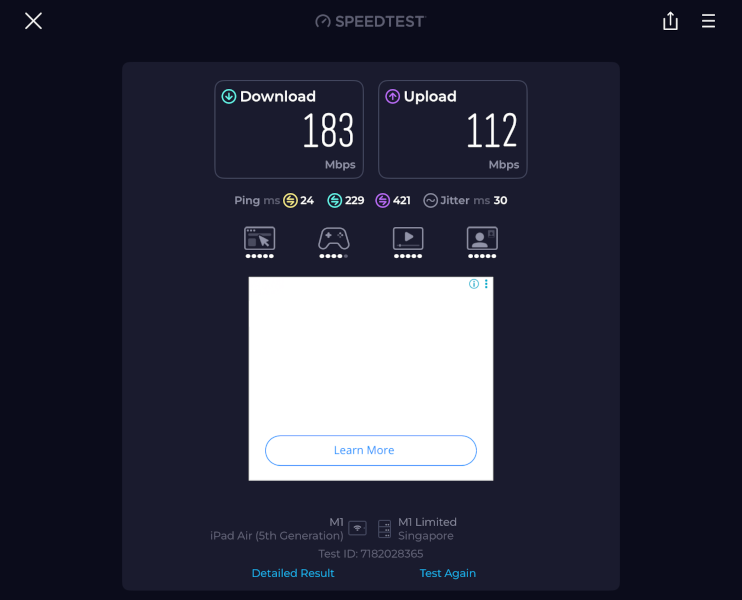
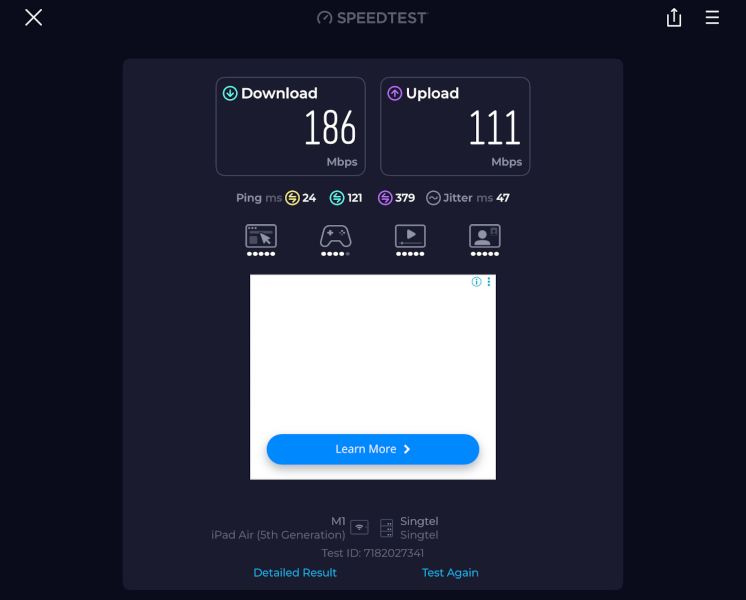
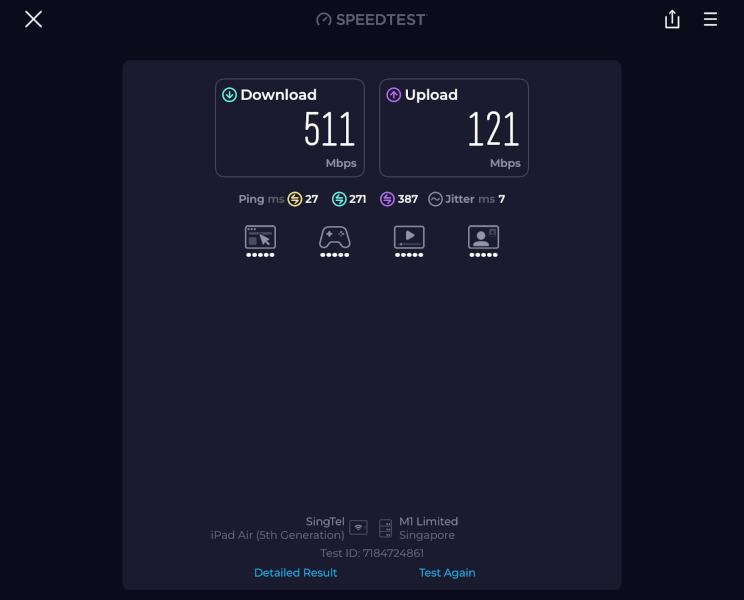
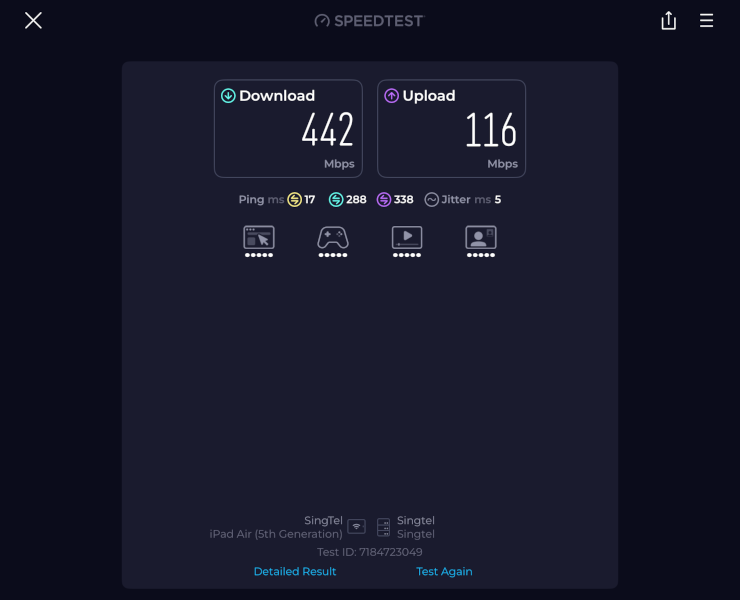
Both SIMs held up well regardless of which server I hit, which is really what you want to see — it means the numbers aren’t just a fluke of one favourable test run.
Does It Work With Singapore SIM Cards? Yes.
This was actually my biggest worry before buying, so let me answer it straight: yes, the ZTE U30 Pro works with Singapore SIM cards.
In practice, I’ve run it on both my circles.life and zero1 SIMs without a single compatibility hiccup — pop the nano SIM in, it detects the network, and you’re online. No carrier-locking, no fiddling with APN settings. That’s actually two different backbone networks confirmed working, not one: circles.life rides on M1, while zero1 runs on Singtel.
On the technical side, the U30 Pro (MU5358) supports 5G bands n1, n3, n5, n8, n28, n41, and n78. That matters because n1 and n78 are the two bands all four Singapore telcos — Singtel, StarHub, M1, and TPG — use for their 5G standalone (SA) networks, and n3/n8 cover the older non-standalone (NSA) layer that StarHub and M1 still run. So between the band support and having personally tested it on both Singtel’s and M1’s underlying networks, this covers the two biggest network backbones in Singapore.
One important caveat, though: I can only vouch for circles.life and zero1 specifically — not for “the M1 network” or “the Singtel network” as a whole. Band compatibility tells you the radio side will work, but it doesn’t guarantee every SIM on that network will – especially with some service providers looking to move to eSIM-only plans (which won’t physically fit a device that only takes a nano SIM, like this one). So while circles.life (M1) and zero1 (Singtel) are both confirmed working, I can’t personally confirm Singtel, M1, Maxx, Gomo, ViviFi, or ZYM specifically — even though several of them share the same underlying network as the SIMs I tested. If you’re on one of those and it works (or doesn’t), let me know in the comments and I’ll fold it into this section.
There’s a separate issue worth flagging too: some providers’ plan terms explicitly restrict or discourage putting a SIM into a standalone MiFi/hotspot device, even when tethering from a phone is completely fine. This isn’t a network or band issue — it’s a plan terms issue, and it varies by provider and sometimes by plan tier within the same provider. A voice-only SIM, for instance, may simply not activate in a MiFi device at all, since it was never provisioned as data-capable. Worth checking your specific plan’s terms (not just “does this telco support 5G”) before assuming any SIM will work in any hotspot.
If you’re on StarHub directly, or a StarHub-riding MVNO like MyRepublic or giga!, the same logic applies — the bands check out on paper, but I haven’t personally tested it myself yet.
Features That Actually Matter
This is where the ZTE U30 Pro review gets more interesting than “it’s a cheap hotspot that works.” A few features I didn’t expect at this price:
Device blacklist — you can block specific devices from connecting to your hotspot, which is genuinely useful if you’re sharing the network and don’t want every device eating your data.
NFC to connect — tap your phone against the device and it joins the network, no manually typing in passwords like it’s 2015.
QR code login — scan and connect, same idea, useful for tablets or guest devices where typing a long WiFi password is a pain.
Touchscreen display — a small screen on the device itself shows signal strength, battery level, and data usage at a glance, so you’re not fumbling through an app just to check how much juice is left.
USB-C charging — no hunting for a proprietary cable, which shouldn’t be a selling point in 2026 but somehow still is for some devices.
Small conveniences, sure, but the kind of thing you don’t expect from a S$120 device bought sight-unseen off Taobao — usually reserved for the S$250+ options.
Pro Tip: Use a VPN When You’re Out and About
Here’s a habit I’d genuinely recommend if you’re using any portable hotspot, ZTE or otherwise: run a VPN on top of it.
A VPN (Virtual Private Network) basically encrypts your internet traffic and routes it through a secure server, so if you’re connecting from a hawker centre, co-working space, or anywhere with a public or semi-public network, your data isn’t just floating around for anyone with the right tools to snoop on. Useful whether you’re doing actual work (client logins, banking, anything sensitive) or just leisure browsing while you’re out.
This isn’t just theoretical paranoia either. In Australia, a man was charged in 2024 for running fake “evil twin” WiFi networks at airports in Perth, Melbourne, and Adelaide, and on domestic flights — networks that looked identical to the real thing, right down to the name, but funnelled anyone who logged in straight to him. He was later sentenced to over seven years in prison. Closer to home, Singapore authorities have separately warned about scammers posing as tech support to “help” with computer or WiFi issues, with over 150 victims losing more than S$7 million in one wave of cases. Different tactic, same underlying lesson: public and unfamiliar networks are exactly where people let their guard down.
It’s a small extra step, but pairing a mifi with a VPN is basically the difference between “convenient” and “convenient and actually secure.”
The VPN I use: NordVPN — sign up via my referral link for a discount on your subscription.
A quick word on how this actually works, since I’d rather be upfront about it: NordVPN runs its own affiliate program, and referrers like me earn a percentage of what a referred customer pays — reportedly up to 100% of the value of a first monthly plan, around 40% on longer 1–2 year plans, plus a recurring 30% every time that customer renews, for as long as they stay subscribed. In plain terms: NordVPN gets a new paying customer, I get a cut of that (and keep getting a smaller cut for as long as you stay a customer), and you get a discount on sign-up. Nobody pays more because the link exists — the commission comes out of NordVPN’s marketing budget, not your wallet.
Other Budget 5G Portable WiFi Options I Found on Lazada and Shopee
Since I also went hunting through Lazada and Shopee before landing on mine, figured I’d share what else is out there if the ZTE U30 Pro or buying from Taobao isn’t quite your fit. If you’re comparing budget 5G portable WiFi options in Singapore more broadly, this table should give you a decent starting shortlist. Every device below already covers the basics — 5G connectivity, battery-powered portability, and a nano SIM slot — so the table only calls out what actually sets each one apart.
Worth saying plainly: going straight to Taobao like I did isn’t something I’d tell most people to do. It worked out for me this time, but I’ve got plenty of Taobao disasters to balance that out. Tablets and laptops that showed up dead on arrival, with exchange processes so painful I eventually just gave up and ate the loss. Motorcycle communication headsets that turned out to be China-region versions — worked fine in China, completely useless the moment you leave the country. The U30 Pro is the exception that happened to go right, not proof that this is a safe way to shop. I was gambling on a device with zero reviews, zero warranty, and zero guarantee it would even recognise a Singapore SIM, and it paid off — but “paid off” is doing a lot of work in that sentence, and I’ve got the drawer of dead electronics to prove it doesn’t always.
Buying locally through Lazada or Shopee closes most of that gap. You get proper local warranty coverage if something dies on you, customer support you can actually reach in a reasonable timezone, faster replacement or refund if a unit arrives faulty, and — for the official-store listings — some baseline assurance the device wasn’t a Taobao gamble that happened to work out. You’ll usually pay a bit more for all that, but for most people that premium buys real peace of mind rather than just a nicer box.
For the “Where to Buy” column: 🏬 marks listings I’d actually recommend — official stores with local warranty coverage. 💰 marks more affordable alternatives to those official listings. 🛒 marks third-party sellers, which can still be perfectly fine but won’t carry the same warranty backing. Some of these are affiliate links, meaning I may earn a small commission if you buy through them, at no extra cost to you. ⭐ next to a device name marks my current top picks at today’s prices.
| Device | Price | What Sets It Apart | Where to Buy |
|---|---|---|---|
| ZTE F50 UFi (F50) | ~S$139 | Cheapest on this list, but WiFi 5 only, and no battery on some listings | 🛒 Shopee |
| ⭐ ZTE U30 Air (MU5001) | ~S$147 | Closest sibling to mine — NFC one-touch connect, but no touchscreen and drops to 10 supported users (vs 16 on the Pro) | 🛒 Shopee |
| D-Link DWR-U2000 | S$194 | Touchscreen and doubles as a power bank, but WiFi 5 | 🏬 Shopee · Lazada · 💰 Shopee · Lazada |
| ⭐ D-Link DWR-U2100 | S$219 | Bigger 6000mAh battery, touchscreen, reverse-charges your phone like a power bank, supports up to 40 users — the newer step-up from the U2000 | 🏬 Shopee · Lazada · 💰 Shopee · Lazada |
| Prolink DL-7211 | ~S$220 | Longest battery life here — 5050mAh, up to 16 hours — and matches the Pro’s exact 16-user support, plus a 2.4″ colour LCD (a status display, not confirmed touch-interactive). No NFC or QR login. A recognisable local brand if you’d rather skip a Chinese import | 🏬 Shopee · Lazada |
| ZTE U50 | S$236 | Steps up from the U30 line — 2.63Gbps throughput and 32-user support, still WiFi 6 | 🛒 Lazada |
| D-Link DWR-X2102 | S$278 | WiFi 6 with an LCD touchscreen — the pricier D-Link step-up | 🏬 Shopee · Lazada |
A caveat on this table: prices and stock on Lazada and Shopee shift constantly with flash sales and vouchers, so treat the above as a starting point for your own search rather than fixed pricing.
Which One Should You Actually Buy?
Worth knowing upfront: the ZTE U30 Pro itself has become hard to find through local Singapore sellers, so this section doubles as “what to buy instead.” There’s a bit of irony here — at S$120, the Pro I actually bought was cheaper than everything in the table below, Prolink included. That price came with real risk (no warranty, no compatibility guarantee) that I wouldn’t casually recommend everyone take on, which is part of why it’s not the default pick here. Here’s how I’d point different buyers to the table above.
Price-sensitive — you want the lowest price and can live with fewer features. The ZTE F50 UFi (~S$139) is the absolute floor here, though you’re on WiFi 5 and possibly without a battery depending on the listing. The ZTE U30 Air (~S$147) is a close second — still budget, and you pick up NFC one-touch connect, at the cost of dropping to 10 supported users.
Value for performance — you want the best experience per dollar, not necessarily the cheapest number. At this price point, the D-Link DWR-U2100 (S$219) and Prolink DL-7211 (~S$220) land close enough together that it’s really a straight feature tradeoff rather than a price decision. The DWR-U2100 has the closest experience to the Pro’s actual touchscreen — confirmed touch-interactive, not just a status display — plus a bigger 6000mAh battery and reverse power bank charging. The Prolink counters with the best battery life on this whole list (up to 16 hours) and matches the Pro’s exact 16-user support, but its screen is a status display rather than a confirmed touchscreen, and it drops NFC and QR login entirely. Want to tap through settings on the device itself? Go DWR-U2100. Care more about battery life and user count than a touch interface? Go Prolink.
The Verdict
For S$120 plus shipping — bought sight-unseen off Taobao with zero warranty and zero guarantee it would even work here — the ZTE U30 Pro punches well above its price point. It replaced a six-year-old Huawei Mobile WiFi 2 Pro that couldn’t hold a stable connection anymore, it costs notably less than the S$200-and-up mainstream options I was originally comparing against, and it comes with features — device blacklist, NFC pairing, QR login — that I didn’t expect to see outside the pricier options.
If you’re in Singapore hunting for a budget 5G portable WiFi hotspot that won’t leave you troubleshooting every other week, this is the one I’d point you to. Just don’t skip the VPN.